Reducing Support Ticket Volume With Proactive Demo Content
Targeted demo videos catch users before they file tickets, cutting support costs without new hires.

What proactive education does to ticket volume: the evidence
Gartner has found proactive customer service can cut support costs by up to 25% while raising satisfaction at the same time, not one at the expense of the other. Forrester's research shows proactive care reduces churn by 10 to 15%. Neither number is a surprise once you look at where tickets actually come from.
The clearest case is Absorb LMS. Their team pulled Zendesk ticket data, found the top ten recurring issues, and broke each one down further by training question. From that, they built Absorb Academy, a self-serve learning portal aimed straight at those issues. Ticket volume dropped 15%, retention jumped 25%, and NPS rose 14%. The mechanism was almost mechanical: the more training a customer finished inside Absorb Academy, the fewer tickets that customer filed. Cause and effect, tracked and confirmed, not correlation dressed up as insight.
Scale that down to something more ordinary. Lorikeet estimates a five-person support team handling 2,000 tickets a month could prevent 500 to 700 of those tickets through proactive work. That's capacity gained without a single new hire, and it's the argument finance teams actually respond to. Teams that skip proactive content pay for that gap anyway. They just pay it every month in agent hours instead of paying it once, upfront, in production time.
Support leaders treat rising ticket counts as a staffing problem. Hire more agents, bolt on a chatbot, tighten the response-time target. All three treat the wound after the cut has already happened. Two categories eat up almost everything in any support queue. A user couldn't figure something out, which is a product gap. Or a user didn't know something had changed, which is a communication gap. Adding headcount fixes neither.
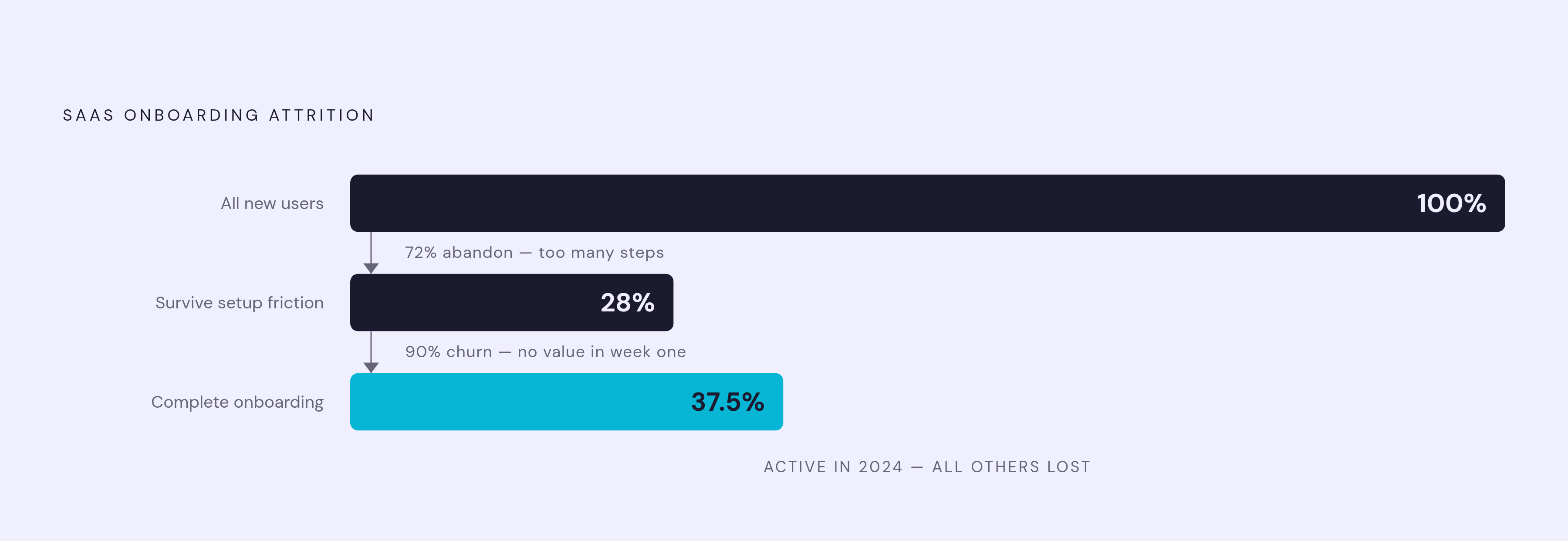
Most of the damage happens during onboarding, and the numbers are blunt. Only 37.5% of new SaaS users completed onboarding and became active users in 2024. Seventy-two percent abandon an app during onboarding if it demands too many steps, and 90% churn if they don't grasp the product's value inside the first week. A rough early experience doesn't just generate a ticket. It can end the relationship entirely, long before anyone has a chance to intervene.
Sixty-two percent of CS leaders have no real-time visibility into onboarding performance, according to OnRamp's research. Because sixty-two percent of CS leaders have no real-time visibility into onboarding performance, the failure compounds quietly for months and appears later as a churn number, long after anyone could have stepped in.
What none of this settles is which format actually does the intercepting. Proactive outreach gets measured broadly across email, in-app messages, and help articles lumped together. Splitting those apart shows the answer stops being close.
The format that does the heaviest lifting in pre-ticket moments: video
Preference data settles this fast. Seventy-four percent of people have used video to learn a new app or website, and 65% say video is their preferred way to understand how a product works. A UserGuiding study found 69% of customers want more video built into onboarding, not less.
The real story is retention. People retain 95% of a message delivered on video, compared to just 10% for the same message in text. That's not a small edge; it's a different order of magnitude, and it explains why a thirty-second clip placed at the right moment beats a paragraph of help-doc text every time.
Business outcomes track the same line. Companies using video for onboarding report 35% fewer support tickets and stronger product adoption. UserGuiding's study found organizations with strong video onboarding see an 82% improvement in time-to-value. Brandon Hall Group found AI-powered video onboarding drives 50% higher retention and 34% faster time-to-value against text-only approaches.
Length is where most teams get sloppy, and it's the wrong place to cut corners. Sixty-eight percent of viewers will watch a video that's a minute or under. Long-form training content and just-in-time deflection content are not the same asset, and treating them as interchangeable wastes both. Best practice for AI training video production points to keeping each asset tightly scoped, with captions and a clear objective, and completion tracked. A short demo dropped at the exact point of confusion does a different job than a comprehensive course library. Build both, on purpose. A single bloated asset trying to serve both jobs will serve neither well.
Knowing video works only gets a team halfway there. Whether anyone actually sees the video before opening a ticket depends on where it lives and what triggers it.
Where to place proactive demo content to intercept confusion before a ticket forms
Userpilot's playbook states the governing rule: a user should learn about a feature, a change, or a workflow before they stumble onto the gap themselves and go looking for support. Simple to say. Much harder to build into a product without it turning into clutter nobody reads.
Start with behavior triggers. If analytics show a user hitting the same dead end across multiple sessions without completing the action, that's the signal to fire an in-app message or an embedded demo right there, before the tab closes. Userpilot's own example makes the point: a tooltip that took hours to build closed a sharp drop-off point at domain verification inside their email activation flow. Tooltips, hotspots, and inline walkthroughs triggered by user behavior don't need engineering resources to ship. Friction that teaches a user something they need is a different animal from friction that just blocks them with no way through. Only the second kind turns into a ticket.
Feature launches need the same discipline. Communication tickets, from users who simply didn't know something changed, are one of the two dominant preventable categories. Guideflow's research on interactive demos points to a workable fix, building one short demo of the new or changed feature, then dropping that same asset into the launch blog post, the announcement email, the in-app notice, and the internal enablement deck, all at once. One piece of content, four channels, nobody running into the change cold and emailing support to ask what happened.
Generic onboarding tours are the trap most teams fall into without noticing. A single tour covering every feature for every user recreates the exact confusion it's supposed to prevent, because a salesperson and an engineer don't need the same fifteen minutes of instruction. Asana built an online academy with education paths split by role, and TechClass notes it helped reduce their onboarding burden. Segment users by role and use case at signup, show each segment only what matters to their own activation path, then track completions against ticket volume afterward.
Help centers fail for a boring reason: they live outside the product, competing against the path of least resistance, which is just emailing support. Embedding a short video demo directly next to the relevant UI element, or inside the help article covering that feature, closes the gap without asking the user to go find it themselves. Pull the last hundred tickets, tag each by type, find what keeps recurring. Every theme that recurs points to a content asset that's either missing or too buried to find.
Interactive demos deserve their own category. GuideFlow's research counts more than ten distinct use cases for interactive demo content, spanning top-of-funnel conversion all the way through post-sale onboarding. One well-built interactive walkthrough replaces a standalone product video, a stack of screenshots, and a live walkthrough call, combined into a single asset that scales without a human sitting on the other end of it.
None of this works if the content doesn't exist yet, and that's where most teams actually get stuck.
The production bottleneck that keeps most teams stuck in reactive mode
Traditional video production runs $1,000 to $5,000 per finished minute. That cost keeps demo libraries thin and out of date even at companies that understand the strategy above perfectly well. Knowing what to build isn't the same as being able to build it fast enough for it to matter by the time it ships.
The demo library describes the product as it existed six months ago. The tickets coming in are about the product as it exists today. Documentation suffers the same decay wearing a different wrapper. Companies routinely lose real capacity to inefficient process documentation, with employees spending time hunting for information that may not even be current anymore. Most SOPs end up as static files buried three folders deep in a shared drive, stale before anyone finishes writing them.
AI tools change that math, and this is where most teams are still underestimating the shift. Artlist's AI Trend Report found teams using AI video tools producing five to ten times more content with the same headcount and budget. That's the gap between a library that trails the product by two quarters and one that gets updated the same week a feature ships.
AI handles cleaning up scripts, generating narration that doesn't sound robotic, adding smart zoom and captions automatically, and spinning out a companion how-to article from the same recording in this pipeline. These are the tedious, technical steps that used to need someone with real video production chops sitting on staff. What stays human is the judgment call: what to explain, to which audience, at which exact moment in their workflow. That's product knowledge, and no tool replaces it, no matter how good the automation gets.
Video and written documentation should come from the same source recording, built together instead of handed off to two separate people running two separate projects. One screen capture, run through the right pipeline, becomes a polished video for the visual learner and a searchable step-by-step guide for the person who'd rather skim text. Same underlying content, two formats, one production pass instead of two.
AI video and documentation tools worth evaluating for a proactive content program
The tool landscape splits into a few distinct lanes: AI video production platforms, interactive demo builders, localization tools, and SOP or documentation software. A proactive content program of any real size draws from more than one lane, since no single tool covers every placement described above. Teams that try to force one tool to do every job usually end up with a worse version of each one.
On the video production side, LTX Studio is built for scenario-based training and animated explainers at scale. Products in this category generally bundle automatic voiceover, smart editing, automated captioning, and brand-consistency controls, so someone without a video production background can put together a usable training asset without waiting on a specialist.
The interactive demo category spans several distinct types: video demo tools, interactive walkthrough platforms, live demo enhancers, and sandbox environments. These are not interchangeable. Interactive platforms are built for onboarding and feature adoption. Live demo enhancers are built for sales conversations. Sandbox environments are built for evaluation, letting a prospect poke around a working version of the product before buying anything. Matching the tool type to the actual use case affects how well the tool performs, and teams that pick one tool and stretch it across all four jobs end up with a demo builder doing a sandbox's job badly.
Localization deserves its own line item, and most teams skip it. Rask AI handles audio and video localization, covering translation, dubbing, and lip-sync at scale. A meaningful share of eLearning content gets delivered to audiences whose primary language differs from the one it was originally written in. A proactive content program built in one language only leaves non-English-speaking users with a thinner deflection layer than everyone else, and that gap is visible in support queues that skew disproportionately international.
For SOP and documentation, Whale pairs AI-assisted procedure writing with built-in training and completion tracking, so a written process doesn't get published and then forgotten. It gets assigned, tracked, and confirmed as understood, closing the same loop the video-side tools are trying to close: content stays current, reaches the right person, and gets measured against how well it actually worked.
Sources
- How to Reduce Support Ticket Volume: The Prevention-First Playbook for SaaS Teams in 2026
- Rivo | 24 Support Ticket Retention Impact Statistics Every Shopify Merchant Should Know in 2026
- Beyond Reactive Support: Using AI for Proactive Customer Engagement | Lorikeet
- Here’s how customer education reduced 15% of Absorb’s support tickets
- Reduce Ticket Volume with Proactive Support Training — TechClass
- guideflow.com