AI Video Tools for Automated Screen Recording Narration in Sales Content
AI automates the entire post-production pipeline for demo videos.
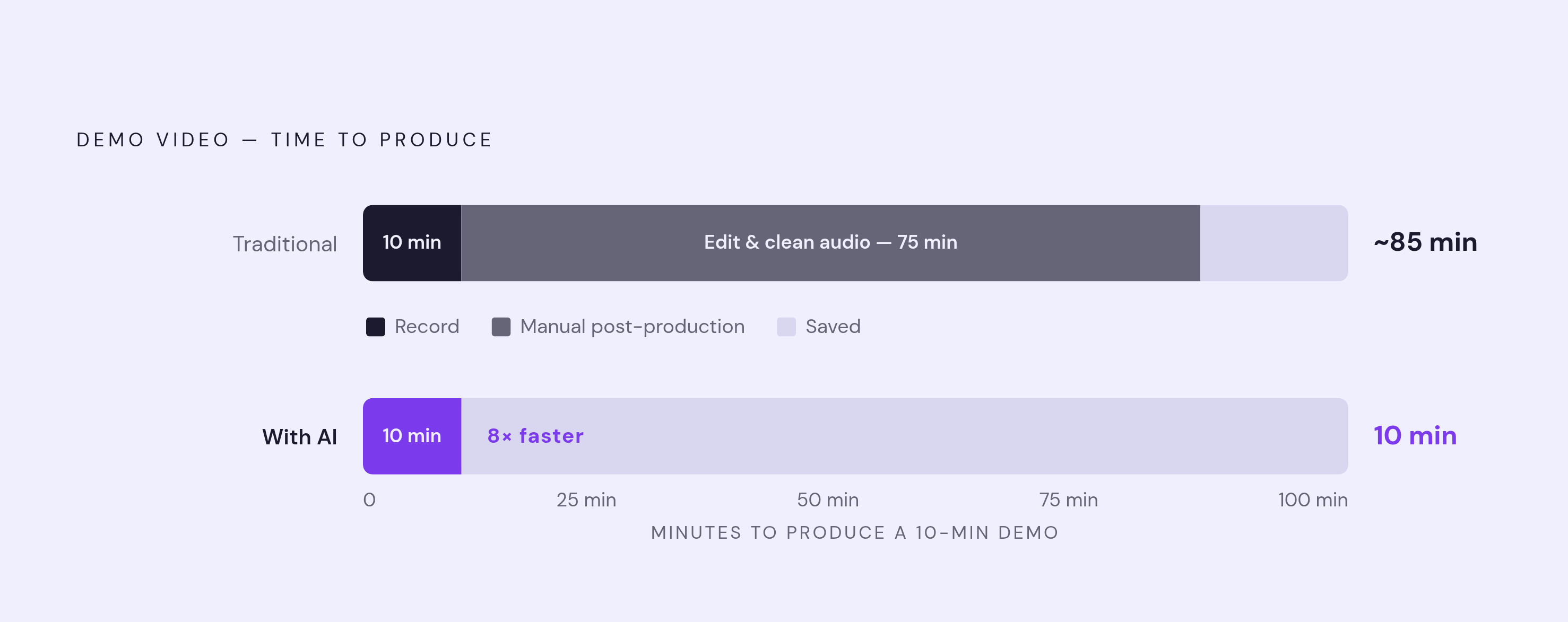
A seller finishes a screen recording in ten minutes, walks through the product cleanly, hits stop, and assumes the hard part is over, but it isn't, since a 10-minute tutorial requires 60–90 minutes of manual post-production work to add zooms and clean audio. Recording a screen walkthrough takes almost no skill. Writing a narration script that explains what's happening on screen does. So does recording a voiceover in a quiet room with a decent microphone, doing it over again after the first three takes sound flat, lining that audio up with every cursor movement, adding captions, cutting the dead air, and exporting a file that doesn't look like something stitched together at midnight. Each of those steps pulls from a different skill set, and most sellers have none of them.
The industry has a number for how bad this gets. A 10-minute tutorial video needs 60 to 90 minutes of manual post-production work just to add zooms and clean up the audio. For a sales team shipping one demo a quarter, that math is survivable. For a sales team trying to keep demo content current as features change weekly, as prospects need different angles, as competitors shift the conversation, it isn't. The editing overhead doesn't scale, so most teams respond in one of two ways: they stop making demo videos regularly, or they send out raw, unedited recordings with dead air and stumbled sentences still in the file. Neither option helps close deals. A sloppy recording tells a prospect the product team doesn't sweat details, which is exactly the wrong impression to leave right before a contract gets signed.
AI running the full narration workflow
The shift that matters here isn't a new filter or a faster export button. AI has taken over the entire post-production pipeline, so a raw recording becomes a finished, narrated video with no human touching it at any step in between.
The old model split the work across people and tools: a screen recorder captured the pixels, a person wrote a script, that same person or someone else recorded voiceover, someone synced the audio to what was on screen, and someone added captions at the end. AI, in that model, might clean up background noise or auto-generate a caption file. It assisted. It didn't run anything.
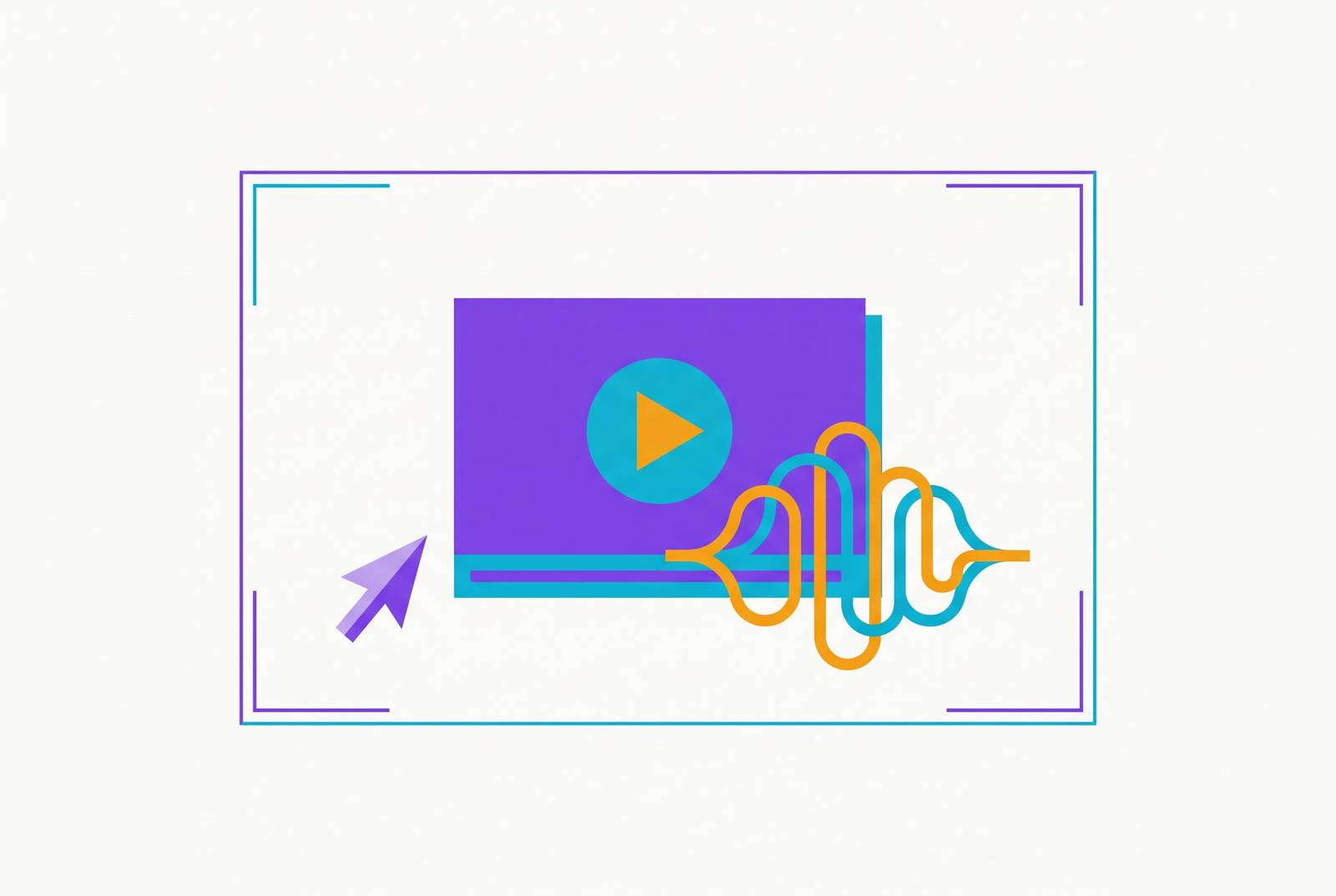
The current generation of tools works differently. The platform watches the recording frame by frame, figures out what's happening on screen without being told, writes the narration script itself, generates a voiceover that sounds like a person speaking, and syncs that audio to the cursor's movements, all without the seller saying a word out loud.
ScreenStory shows what this looks like in practice. Upload any screen recording, and the platform analyzes it frame by frame, generates a script, produces a natural-sounding voiceover, and overlays captions. The processing runs on self-hosted H100 GPUs, which keeps footage from passing through third-party AI clouds. That matters if a sales team is recording a roadmap feature that hasn't shipped yet.
VideoMule runs the same idea through a browser, so you need no desktop software. A seller records silently, with no script and no microphone, and the AI identifies every click and page the seller visited, writes a step-by-step script from that sequence, generates a voiceover, and syncs the pacing of that audio to how fast the mouse moved.
What makes both of these possible is dedicated inference hardware paired with frame-level video understanding. The system reads intent from what the cursor does, not from what the seller says out loud, so there's nothing left for the seller to perform. The skill requirement for producing a professional demo has dropped to one task: record the workflow. Everything after that is automated.
The functional categories in the 2026 AI screen recording tool landscape
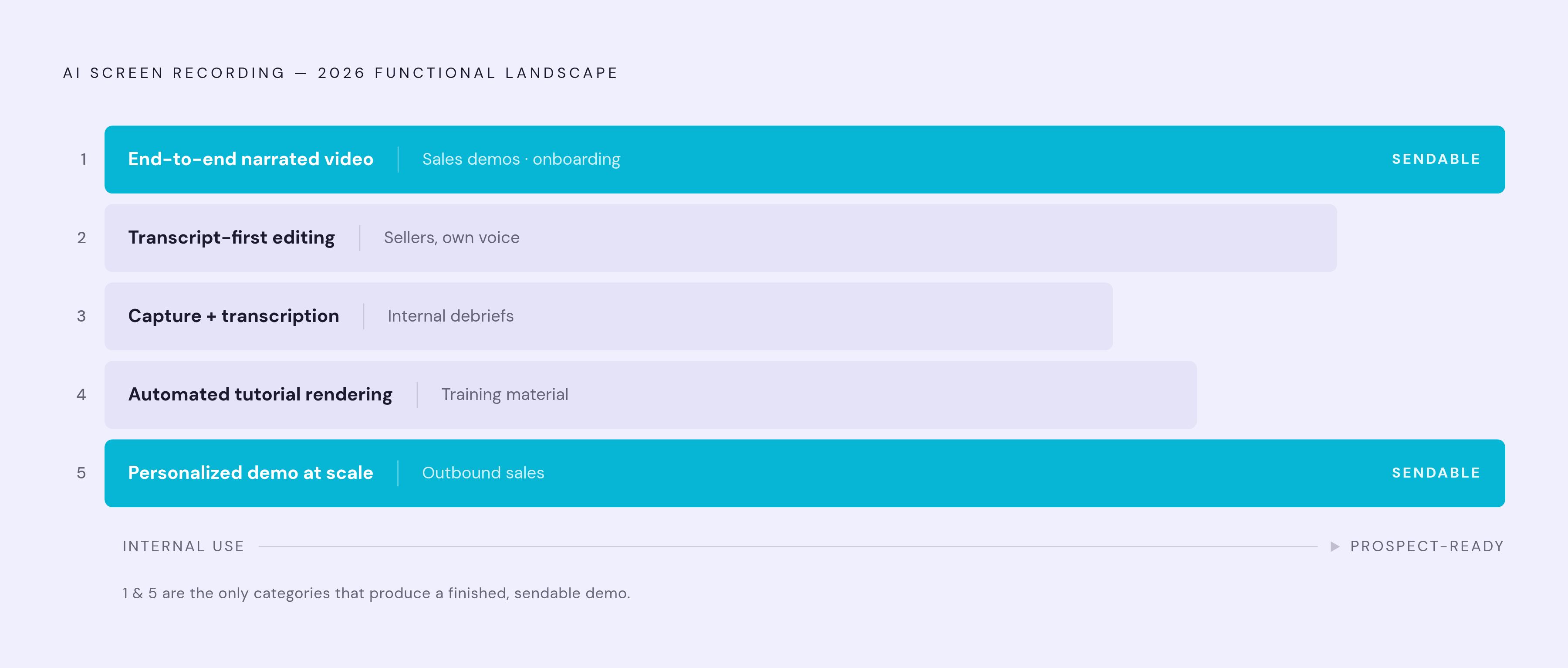
AI screen recording tools don't all do the same job, and the field has split into five distinct functional categories. Picking the wrong category wastes time no matter how good the tool is within it.
Category 1 covers end-to-end narrated video production from a silent capture. The tool watches the recording, writes the script, generates the voiceover, adds captions, and exports a finished video, with no microphone needed at any point. This category fits sales demos, product walkthroughs, and onboarding content that has to look polished the moment it's sent.
Category 2 is transcript-first editing. These tools transcribe voiceover audio the seller already recorded and let that seller edit the video by editing the text transcript: delete a sentence, and that chunk of video disappears with it. This suits sellers who are comfortable recording in their own voice and just need fast cleanup without dragging clips around a timeline.
Category 3 is capture-plus-transcription, nothing more. These tools record and auto-transcribe, add searchable chapters, and let users ask an AI questions about the recording's content. There's no script generation and no voiceover synthesis here, which makes this category a fit for internal debrief recordings or async team updates, not something to send a prospect.
Category 4 is automated tutorial rendering with smart zoom. The editing intelligence sits inside the recording process itself, auto-zooming on clicks, animating the cursor, suppressing background noise, so the final output needs very little post-processing. This category was built for software tutorial content and training material.
Category 5 is personalized demo creation at scale. These tools take one recording and generate hundreds of variations from it, handling voiceovers, localization, branding, and transitions automatically. This is the category for outbound sales teams sending personalized demo videos to long prospect lists.
A seller trying to get a narrated demo in front of a cold prospect needs Category 1 or Category 5. A Category 3 tool, however capable, will transcribe the recording and let the team search it later, but it will not write a script or generate a voice. Knowing which category solves the actual problem matters more than comparing feature lists across categories that were never built for the same job.
Tools built for automated narration of sales screen recordings
Trupeer handles both the script and the document in one pass: it writes a narration script, strips out filler words and awkward pauses, generates a voiceover, and produces a structured document alongside the finished video. A SaaS product demo team that measured its own workflow found traditional editing took around two hours per demo; the AI workflow took about 10 minutes for the same output. That gap matters most for SaaS sales teams, since their demos need to stay current every time the product changes.
ScreenStory runs an end-to-end AI video production pipeline built around privacy-focused infrastructure. Because processing happens on self-hosted infrastructure rather than through third-party AI providers, footage never leaves a controlled environment. Enterprise sales teams recording roadmap material or features that haven't shipped yet need to weigh that. ScreenStory fits tutorial and documentation content better than entertainment or gaming recordings, and it currently runs as a web platform with no native desktop capture, so recording happens in a separate tool before the file gets uploaded.
VideoMule offers silent capture with browser-native AI narration. Editing here is text-first: change a line in the script, and the audio regenerates on its own, with no re-recording needed. VideoMule also translates into more than 70 languages with automatic voiceover regeneration, turning one recording into a multilingual demo library without a separate localization step. Role-based team access lets a team review before anything goes out the door.
FocuSee takes an automation-first approach to tutorial rendering, building editing intelligence into the recording itself. It includes an optional AI avatar that replaces webcam footage with a virtual presenter, along with a built-in teleprompter for sellers who'd rather script a walkthrough before hitting record. FocuSee fits software tutorials and sales demos where the viewer's attention needs to track a specific path through the interface.
Guideless identifies the sequence of steps in a recorded workflow, writes those steps out, adds captions, and generates a voiceover from a single screen capture. What sets it apart is the range of outputs it pulls from that one recording: a finished demo video, a PDF, and a Markdown file, so a single capture can feed a help center, a learning system, and an internal wiki without rebuilding the content for each one. That makes Guideless a strong fit for sales enablement and customer education teams at SaaS companies, where the same recording often needs to serve a prospect demo and a post-sale onboarding guide.
ScreenApp takes a different route: capture plus transcription with AI search and chapters. It transcribes the voiceover after the seller finishes recording, breaks the video into chapters automatically, and lets anyone search the recording by keyword or ask an AI a question that jumps straight to the right timestamp. Its free plan includes two transcriptions of recordings up to a generous length each, with no watermark, and exports transcripts as PDF, Word, TXT, SRT, or VTT. ScreenApp suits internal sales debriefs, searchable demo libraries, and support content well. It doesn't generate narration for a seller who records silently and wants a finished script written for them.
Camtasia combines recording and timeline editing in one desktop application. It moved to an annual subscription model only, after perpetual licenses were discontinued in 2025, though a free trial is still available. Its AI features cover captions, script generation, and voiceover synthesis, with the latter two gated behind the Create and Pro plans through Camtasia Audiate, and the seller still has to record their own narration and edit the result by hand. Camtasia fits L&D teams building formal training content or IT departments building tutorials that need quiz functionality, and it's a heavier lift than most high-volume, fast-turnaround sales demo workflows call for.
OBS Studio sits at the other end of the spectrum: free, open-source, infinitely configurable capture for people who want full control. It supports unlimited scenes, real-time audio mixing, hardware-accelerated encoding, and direct streaming, all at no cost. It has no built-in editor and no AI editing features beyond native audio processing like VAD noise suppression, and it has no hosting or sharing links built in. OBS Studio makes sense for a sales team that already has a dedicated video editor on staff and just needs a high-quality, free way to capture the screen in the first place.
Choosing a narration tool for sales content
Sales demo content comes with requirements that rule out several otherwise solid tools, and the criteria that matter here differ from what an L&D team or an internal comms team would prioritize.
Silent narration generation requires no microphone and tops the list. A seller working from a shared office, traveling between meetings, or just trying to move fast cannot reliably deliver a clean voiceover on demand. Tools that build narration from what happens on screen rather than from recorded speech remove that constraint. That is why Category 1 and Category 5 tools matter so much for this use case specifically.
Text-level script editing that regenerates audio automatically keeps a demo from going stale. When a pricing page changes, a feature gets renamed, or a prospect's use case calls for a different emphasis, a seller should be able to edit one sentence and have the voiceover update on its own, without booking time to re-record. That editing model is what keeps a video library current instead of outdated the moment the product moves.
Segment-level editing matters just as much. A sales demo is rarely one single, unbroken recording start to finish. Being able to swap out, regenerate, or reorder individual scenes without reprocessing the entire video saves real time for teams reusing the same core content across different prospect conversations.
One-click translation with automatic voiceover regeneration turns a single recording into a library a global sales team can actually use. Teams without a dedicated localization function can't manage a separate workflow per language, so tools that translate the script and regenerate the voice in that language automatically make multilingual demo content realistic rather than aspirational.
Output format matters too, and it depends on how the content gets reused. Some tools produce video only. Others produce a finished video alongside a structured document from that same recording, so one capture can serve a prospect demo, a help center article, and an internal onboarding guide without recording the same workflow three separate times.
None of these criteria replace judgment about the specific sales motion a team runs. If a team does high-volume outbound with heavy personalization, it will weigh Category 5 tools more heavily. A team maintaining a smaller set of core demos that need to stay accurate as the product ships weekly will weigh script-editing and voiceover regeneration more heavily. What stays consistent across both is the baseline: a sales demo has to look finished the moment it's sent, and the tools built for that standard are the ones that remove the editing step completely rather than just making it faster.
Sources
- AI Corporate Video Production in 2026: Best Tools & Case Study - Leadde Blog
- Best Screen Recording Software in 2026 — ScreenStory Blog
- AI Screen Recorder - Free with Auto Transcription
- 10 Best AI Screen Recording Tools for Effortless Video Guides (September 2026)
- 5 Best AI Screen Recorder Tools to Automate Workflow (2026)
- AI Screen Recorder - Record, Script & Narrate in Browser
- Trupeer AI